Key takeaways
- Choosing the right LMS starts with clearly defining your business goals and how you'll measure success. Address ROI from the start, not after implementation.
- Secure buy-in from a wide range of stakeholders beyond HR, including IT and key business leaders who will ultimately benefit from and fund the LMS.
- Evaluate vendors not just on key platform features. Instead look for a provider that offers responsive customer support, collaborative problem solving, and a commitment to your success.
Choosing a new learning management system is one of the most significant technology decisions an HR or L&D leader will make. This guide will help you select the best learning management system for your organization. The goal is to find the perfect learning management system tailored to your unique organizational needs and objectives. The right LMS platform can transform your organization's approach to training, drive employee development, and deliver a measurable return on investment. The wrong one can lead to low adoption, frustrated learners, and a costly search for a replacement within just a few years. In fact, Gallup reported that “last year, global employee engagement fell, costing the world economy US $438 billion in lost productivity.” The top way to cut employee disengagement is to ensure all managers receive adequate training, and “less than half of the world’s managers (44%) say they have received management training.”
With hundreds of vendors claiming to offer the latest LMS features, how do you find the platform that truly meets your specific needs? Start by identifying essential features based on your goals, technical requirements and how the learning solution will drive organizational success. Then secure buy-in and find a true partner, not just a software provider.
This comprehensive guide provides a framework for making that decision, drawing on insights from industry analysts, our own learning technology experts, and real-world customer experiences. It will help you ask the right questions, involve the right people, and build a business case that demonstrates value from day one.
What is an LMS?
If you work in HR, you probably already know what an LMS is. But if you're part of the buying committee from another department like Finance or IT, you may be less familiar with this technology.
A Learning Management System (LMS) is a software application that centralizes, manages, and delivers learning activities across your entire workforce. Think of it as your organization's digital university, which provides a single, unified platform for creating, distributing, and tracking training programs that help you scale employee development.
With workplace dynamics shifting and AI rapidly changing how we work, having a learning platform that effectively upskills your workforce should be a priority. According to a Linkedin Workplace Learning Report, 68% of employees agree learning helps them adapt to change. It’s important to establish a workplace culture that encourages employees to learn new skills by offering learning tools that’ll help them acquire the skills needed to adapt quickly to the rapidly changing world. So choosing the right LMS with the right features to encourage skill building and identifying skills gaps is a critical component of what can make or break your organization's ability to stay competitive and drive measurable business results. If you’d like to know more about LMS platforms, please read our comprehensive on guide on learning management systems.
Build a business case for your LMS
Too often, the search for a new LMS begins with a list of features. While functionality is, of course, important, a more effective starting point is to clearly document the "why" behind the investment. These are important questions to ask yourself before you start shopping for an LMS:
- What specific business problems are you trying to solve?
- What measurable outcomes do you expect to achieve?
Answering these questions upfront is the first step toward calculating a credible return on investment (ROI). After identifying measurable outcomes, it’s essential to create a realistic project roadmap that breaks down your broad goals into actionable steps, ensuring each objective is achievable within your timeline.
As learning technology expert Brett C. Wilson advises in Cornerstone's LMS ROI guide, "I always encourage organizations to address this ROI question from the very beginning, i.e., when you are in the process of selecting an LMS and capturing stakeholder buy-in." By articulating your business goals before you even look at an LMS demo, you create a scorecard for evaluating potential vendors and a baseline for measuring success after LMS implementation.
Your business case should address several key areas. For many organizations, particularly those in regulated industries, compliance is a primary driver. The cost of non-compliance can be staggering, with the average employment lawsuit costing a company $490,000. A modern LMS solution provides an automated, auditable system for delivering and tracking mandatory training, making it a strong business case for mitigating this significant financial and legal risk.
Beyond compliance, consider the impact on revenue, cost savings, and employee engagement. Below are more questions to consider before you start selecting an LMS:
- What’s your budget? And is there any wiggle room for certain features?
- Will the LMS help you onboard new sales reps faster, leading to quicker time-to-revenue?
- Will it reduce travel costs by enabling more virtual training?
- Will it improve employee retention by providing clear learning paths for career development?
These are the kinds of metrics that resonate with business leaders and justify the investment.
Secure stakeholder buy-in
Choosing a learning management platform is not a decision that should be made in an HR silo. The most successful implementations involve a cross-functional team of stakeholders who have a voice in the LMS selection process. As Wilson notes in his guide, "Equally important is stakeholder buy-in by function or line of business. In addition to HR, the IT department will likely be involved, and they need to be a part of any implementation from the start – even if they don't own the project."
Your stakeholder team should include representatives from:
- HR and L&D: The primary owners of the system, responsible for learning strategy and administration, including user management.
- IT: To evaluate technical requirements, security, and any LMS integrations.
- Key business lines: Leaders from departments like sales, manufacturing, or customer service who have specific training needs and will be the ultimate "customers" of the LMS software.
- Finance: To validate the business case and ROI calculations.
- Learners: A representative group of employees who can provide feedback on the learning experience and user interface.
By involving these groups early, you ensure that all perspectives are considered and build a coalition of support that will be invaluable during implementation. When the new head of manufacturing asks why the company is investing in a new learning platform, you'll have a documented business plan with their department's input already included.
Case study: How choosing top-tier customer support helped United Airlines boost training
With a clear business case and a dedicated team, you can begin evaluating LMS vendors. While it's tempting to get lost in feature comparisons, it's crucial to assess the vendor's ability to be a true partner in your success. This was a key factor for United Airlines when they selected Cornerstone to train their 145,000 employees.
Laura Sweeney, Senior Manager of Global Learning and Talent Technology at United, emphasizes this point: "Cornerstone is more than a product. It's a partnership. We've had challenges where we've been able to reach out to the team, brainstorm solutions, and come up with the best outcomes." This collaborative partnership is essential for navigating the complexities of a large-scale implementation and ensuring the chosen LMS solution evolves with your needs.
When evaluating potential partners, consider the following:
- Implementation services: What level of support do they provide during implementation? Do they have experience with organizations of your size and complexity?
- Customer community: Is there an active community of other customers you can learn from and collaborate with?
- Product vision: Do they have a clear roadmap for future development that aligns with your long-term goals?
As Forrester Research noted when naming Cornerstone a leader in their evaluation of the 10 top LMS vendors, a strong choice has "a clear understanding of the needs of the learning leader as a buyer." This deep industry knowledge and customer-centric focus are the hallmarks of a true partner.
Evaluate LMS features needed for your organization
While partnership is key, the LMS platform itself must have the right capabilities to meet the demands of a modern, often global, workforce. The best LMS platforms integrate learning into the flow of work, delivering microlearning modules, just-in-time training resources, and contextual help exactly when and where employees need them. When choosing an LMS consider how seamlessly the learning management system will integrate into their existing workflows, how intuitive the user interface feels for eager and busy learners and admin. Based on Forrester's criteria evaluation and the real-world needs of customers like United Airlines, here are core LMS features and capabilities:
Must-have LMS features
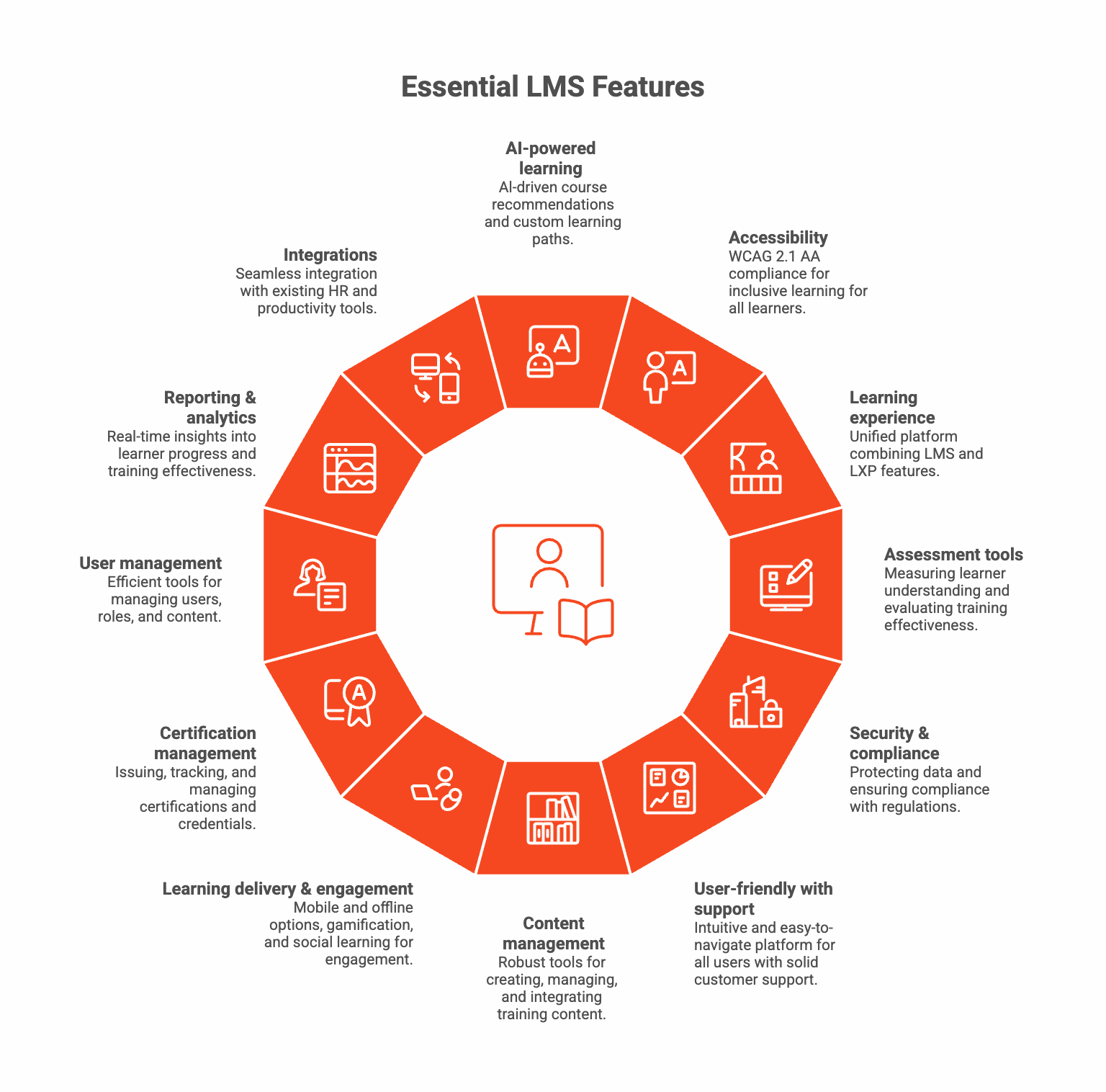
Whether you’re a small business or enterprise level organization, below is a list of features that any LMS in the post-AI era should offer in no particular order.
1. AI-powered personalized learning paths
An advanced LMS should offer AI-powered course recommendations based on user behavior, skills, and interests to improve learner engagement. The ability to create custom learning paths based on job roles, skill levels, and individual goals is vital. Learners should progress at their own pace while meeting required training milestones. Look for a platform that offers intelligent content discovery and curation, helping learners find relevant resources based on their role, past activity, and learning objectives.
2. Accessibility
Before selecting an LMS, evaluate if the platform complies with WCAG 2.1 AA standards at minimum, ensuring that all learners, including those with disabilities, can fully participate in training programs. Features like screen reader compatibility, keyboard navigation, closed captioning, and adjustable text sizes demonstrate a commitment to equitable learning experiences for everyone.
3. Learning experience
A true and comprehensive, integrated learning solutions include learning experience, not just learning management. Many organizations are looking for a single, unified platform that combines the administrative power of an LMS with the engaging discovery of an LXP. Other important LMS integrations include having data synchronization with performance management and succession planning tools. This eliminates the need for multiple disconnected systems and provides a seamless experience for learners.
4. Assessment and testing tools
Essential for measuring learner understanding and evaluating progress, these tools help organizations evaluate training effectiveness and ensure learning objectives are met. Key features should include the ability to create comprehensive tests with various question types, such as multiple choice, true/false, essay, and matching, to effectively measure learner comprehension and knowledge retention. Creating short quizzes that show up throughout the learner journey can also help maintain engagement. Beyond traditional assessments, look for platforms that support skills assessment and management capabilities. A skills-based training platform should evaluate both technical and soft skills, track skill development over time, and identify skill gaps across your organization to inform targeted training initiatives.
5. Security and compliance features
Strong data encryption, secure hosting, frequent security audit, and top compliance certifications, such as SOC 2, ISO 27001 or GDPR, are crucial to avoid the average $14.82 million cost of non-compliance. There are also industry specific compliance regulations your organization may require such as FedRAMP or GxP compliance. Prioritize platforms built on “compliance by design,” offering automated tracking, audit-ready reporting, granular access controls, real-time alerts, and global privacy support for GDPR, CCPA, and other region-specific data regulations. In the era of AI and automation, AI powers recommendations and analytics, so consider learning platform providers with responsible-AI credentials (e.g., ISO/IEC 42001), transparent algorithms, auditable actions, and bias-mitigation safeguards. Before signing a contract, verify their certifications, audit frequency, logging depth, incident-response procedures, and automated recertification workflows. At the end of the day, a compliance-ready LMS is a strategic shield for your data, reputation, and bottom line.
6. User-friendly interface and solid customer support
An intuitive, easy-to-navigate interface is essential for both administrators and learners. The platform package should include training and customer support to use effectively, with clear navigation and streamlined workflows that reduce complexity and frustration. On the customer support side, here are some questions you can ask the vendor:
- What are the support hours and service level agreements?
- Do you have a dedicated support team?
- Is 24/7 technical support available for global organizations?
For more advanced and complex organizations, a more sophisticated LMS may be required. In that case, look for an LMS provider that offers additional training, documentation, platform certifications and ongoing customer support. Sufficient training support for LMS users is important to ensure effective adoption and utilization of the tool.
7. Content management, creation and integration
Training content is arguably the most important feature of an LMS, however, some folks may already have their own learning content management system (LCMS) and only need a tool that can seamlessly integrate with it. However, for most LMS shopper, especially at the enterprise level, having can LMS with robust learning content creating and management capabilities is a must! Given the importance of training content, we’ll cover this section more extensively. So before exploring you training content needs, ask yourself the following questions:
- Will you be creating your own content?
- What format do you want to use (e.g., PDF, interactive quizzes, videos, VR, etc.)?
- Do you just want a platform to host your learning content?
- Are you looking for an LMS that has an extensive learning course library?
- Who will the content be for? For example, is it just for internal team members or do you also need learning content for external partners and customers?
- If you’re offering content to your external partner or customer: Do you need to charge for any of these learning materials?
- Lastly, do you have learners located in countries outside your own where they speak a different language?
We’ll cover more about content for global teams below under the “Multilingual content management” subsection, but to learn more about features that allow you to provide learning content to external learners, read our “Extended Enterprise” section. If you’ve answered all these questions and determined your content needs, consider which of the following content capabilities your organization will need:
Content authoring tools
Built-in course creation capabilities allow you to develop training materials directly within the LMS. Look for platforms that support multiple content formats including videos, documents, presentations, and interactive or immersive elements without requiring third-party authoring tools. Additionally, robust content quality management features ensure that all newly created learning materials meet your organization's standards. This includes version control, content review workflows, approval processes, and the ability to flag or retire outdated materials to maintain a high-quality learning library.
Extensive course content library
Access to courses and learning material that’s already been created by subject matter expert is vital if you’re relying on courses through external sources. A robust content library saves time and resources while ensuring high-quality learning materials and can accelerate your training program deployment.
Curriculum management
For organizations that need to deliver custom learning programs, comprehensive curriculum management capabilities are essential. The learning platform should allow you to build multi-course learning programs, define prerequisite relationships, sequence content logically, and manage program requirements. This feature is particularly valuable for onboarding programs, leadership development tracks, and role-based certification programs that require learners to complete multiple courses in a specific order.
Support for eLearning standards
If you have specific needs, you may need to ensure the LMS supports SCORM, xAPI (Tin Can API), AICC, and other common eLearning standards. This compatibility ensures your content works seamlessly across different systems and provides detailed tracking of learner activities.
Multilingual content management
For global organizations, the ability to deliver consistent training content across different languages and regions is essential. Evaluate the platform's ability to manage and deliver training content in multiple languages.
8. Learning delivery and engagement
Before you decide your learning delivery and engagement needs, ask yourself the following questions:
- Do you have a deskless workforce?
- Are some of your employees located on-site, off-site or globally?
These are the questions you need to ask yourself when considering features related to learning delivery methods. Below are some features to consider:
Mobile and offline options
When evaluating LMS options, consider whether the system supports blended learning approaches that combine online courses with offline options. For the organizations with a large deskless workforce, this is often a vital feature. It should support mobile learning via native iOS or Android apps along with offline access of material so employees can keep training even without connectivity.
Gamification features
Elements like badges, points, leaderboards, and achievements increase learner motivation and engagement. Gamification transforms training into an interactive and competitive experience that drives course completion rates and boosts learner engagement.
Social learning capabilities
Built-in forums, community groups, discussion boards, peer review, messaging, and chat features enable collaborative learning. Social learning options allow employees to share knowledge, ask questions, and learn from peers, creating a more dynamic and engaging learning community.
Interactive learning elements
Support for quizzes, assessments, surveys, videos, VR simulations, and other interactive content keeps learners engaged. The learning platform should deliver uninterrupted, blended learning experiences across multiple content formats.
9. Certification and compliance training management
In certain industries, like healthcare or the public sector, being audit-ready is key! Below are some features to explore if your business needs require up-to-date courses and certifications.
An important component, especially for compliance-driven industries, is the ability to issue, track, and manage certifications and credentials. The LMS should automate certificate generation, track expiration dates, and trigger recertification workflows.
10. User management and administration
It’s not absolutely necessary to have robust user management capabilities, but it will sure make your life easier learning management more seamless. A well-designed administrator experience and platform should include efficient tools for managing users, content, and reporting without unnecessary clicks or complicated processes. We recommend investing in a tool that offers the following capabilities:
User management
Advanced user management features should allow you to create user groups, assign roles and permissions, manage hierarchies, and control access to specific content and features. Granular permission settings ensure the right people have access to the right resources.
Auto-enrollment and notifications
An agile-driven platform should support automatic enrollment based on triggers like job role, department, or hire date. Automated email notifications and reminders keep learners on track and reduce administrative burden, time and costs.
Learning portals for multiple audiences
The ability to create separate branded portals for different training audiences (employees, customers, partners) within a single LMS instance allows you to manage multiple programs efficiently while maintaining distinct user experiences.
11. Reporting and data analytics
This is another area that isn’t absolutely necessary, but it’s kind of the whole point of investing in a powerful learning solution. Having the right data at your fingertips will help you also the learning leader makes strategic decisions driven by set goals. We recommend investing in a tool that offers the following capabilities:
Analytics
The learning platform should provide powerful reporting dashboards with real-time insights into learner progress, course completion rates, assessment scores, and training effectiveness. Customizable reports can easily help you track KPIs and demonstrate ROI to stakeholders.
Audit trails and compliance reporting
Comprehensive audit logs that track all system activities, user actions, and training completions are essential for compliance and accountability. The system should generate compliance reports that meet regulatory requirements.
12. Integrations
The best learning management systems out there will seamlessly integrate with your existing HR systems, such as your HRIS and performance management tools, and will also offer integration capabilities with productivity tools, like Microsoft Teams, Slack, and other workplace applications to allow learners to access training content without leaving their primary work environment, which tends to improve adoption and knowledge retention. Integrations ensures that user data, training records, and other key information can be accessed in areas where you can work the most efficiently.
Additional LMS features to consider
When evaluating LMS options, it’s crucial to identify and prioritize your organization’s must-have features. We mentioned essential capabilities that are non-negotiable for most business needs. However, there are other features you may want to consider. Some might be required for your organization, while others might nice to have.
Technical capabilities
Some of these technical capabilities can be seen as must-have features. And for security or integration needs, you may have certain limitations, so make sure you check with your internal teams on what requirements you have in terms of technical features. Below are some features to consider:
Single Sign-On (SSO)
Integration with SSO providers like Okta, OneLogin, and Azure AD streamlines the login process, improves security, and enhances user experience by allowing learners to access the LMS with their existing corporate credentials.
Immersive learning technologies
Look for a platform that supports the future of learning, including virtual reality (VR) and other immersive training methods. As Juliet Denkcla, Senior Manager of Learning Strategy at United Airlines, notes, Cornerstone's ability to integrate the latest technologies was "critical in ensuring the success of our training programs.”
Robust enterprise capabilities
Extended enterprise
If you train external audiences such as customers, partners, distributors, or franchisees, your LMS needs extended enterprise support. This includes the ability to create separate branded portals for different audiences, manage multi-tenant environments, track training across organizational boundaries, and potentially offer e-commerce functionality. E-commerce features allow you to monetize your training content by selling course subscriptions or certifications to partners and customers. These capabilities should allow you to generate revenue by having the flexibility to manage subscriptions and payments.
Customization and branding
This is a nice to have. One feature that typically larger, enterprise businesses will look for is custom branding, not only for the extended enterprise. The ability to fully customize the look and feel of your learning platform with your organization's logo, colors, and branding creates a cohesive experience. Custom domains, branded emails, and personalized interfaces help to reinforce your company’s identity.
Is Cornerstone right for you?
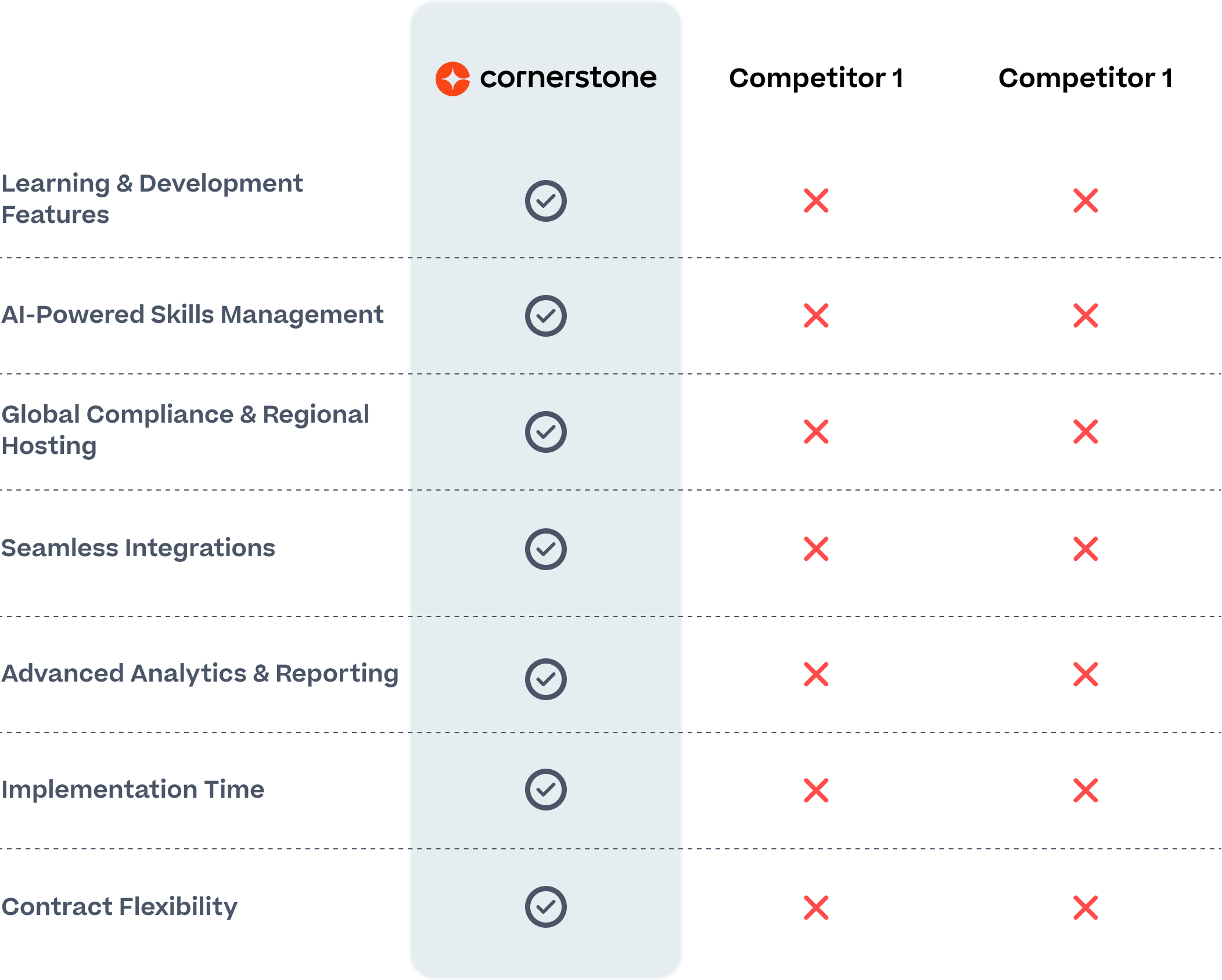
If you’re looking for an LMS with all the capabilities we mentioned, then you’ve come to the right place, Cornerstone is leading in LMS and LXP industry according to the latest Forrester Wave™ report. Cornerstone offers all the capabilities any organization needs.
Questions to ask potential LMS vendors
When evaluating LMS providers, buyers consistently ask about several critical areas. Based on 25+ years of experience in the learning and development space, below are the questions that matter most to our customers.
Content and learning delivery questions:
- How do you support content creation and curation?
- What is the mobile experience for accessing and completing training?
Data and integration questions:
- How do you support reporting for learning data requirements?
- Can your solution integrate with HRIS platforms, other HR providers, and ATS or recruiting solutions?
Skills and career development questions:
- How do you support skill development?
- How is learning personalized for relevance and career growth?
- Is career pathing accessible for both employees and managers to self-navigate?
Top partnership and support question:
- What support and training does the LMS vendor offer?
These questions reflect the real concerns buyers have when investing in learning technology, and they should guide your vendor conversations. If you want to see a comprehensive list of questions to ask LMS vendors, download our learning technology buyer guide. If you’re an SMB, make sure to review our SMB learning and HR tech buyer guide.
Making your final LMS vendor decision
Choosing the right LMS is complex, but a structured evaluation process can lead you to the right choice. By starting with a clear business case, securing broad stakeholder buy-in, and focusing on finding a the best LMS provider with the right technical capabilities for your organizational needs, you can select a platform that will not only meet your immediate needs but also grow with your organization for years to come.
Consider taking advantage of free trials offered by vendors to test the platform hands-on. During the trial period, involve actual users on both the administrator's side and actual learners to evaluate the system's usability and functionality in real-world scenarios.
Remember that the goal is not just to buy a piece of software, but to invest in a LMS solution that empowers your employees, mitigates risk, and drives business results. With the right LMS platform and the right partner, you can build a learning ecosystem that becomes a true competitive advantage: One that proves itself worthy of any challenge when it comes to demonstrating ROI and business impact.
Common LMS selection questions and answers
How long does it take to implement a new LMS?
Implementation times can vary widely depending on the complexity of your organization and the platform you choose. A simple implementation for a mid-sized business might take a few weeks, while a complex, global implementation for a large enterprise could take several months. A good vendor partner will work with you to develop a realistic implementation timeline.
How much does an LMS cost?
LMS software pricing is typically based on the number of users and the specific LMS features your organization requires. Most vendors use a subscription model with a per-user, per-year fee. When evaluating cost, be sure to consider the total cost of ownership, including implementation fees, support costs, and any additional fees for integrations or content.
How do I convince my leadership to invest in a new LMS?
A strong business case is key. Focus on the measurable business outcomes you expect to achieve, such as reduced compliance risk, lower training costs, or faster time-to-productivity for new hires. Use industry data, like the average cost of a non-compliance lawsuit, to quantify the financial risks of inaction.
What's the difference between a cloud-based LMS and an on-premise LMS?
A cloud-based LMS is hosted by the vendor and accessed through a web browser, while an on-premise LMS is installed on your own servers. Today, the vast majority of organizations choose a cloud-based LMS due to lower upfront costs, easier maintenance, and automatic updates.
What types of content formats does the LMS support?
Questions may arise about compatibility with various formats such as videos, SCORM, xAPI, PDFs, quizzes, surveys, and instructor-led training. A powerful learning tool will offer training content in different formats.


